Architectural design support software Product List and Ranking from 6 Manufacturers, Suppliers and Companies | IPROS

Last Updated: Aggregation Period:Sep 23, 2026~Oct 20, 2026
This ranking is based on the number of page views on our site.

Architectural design support software Manufacturer, Suppliers and Company Rankings

Last Updated: Aggregation Period:Sep 23, 2026~Oct 20, 2026
This ranking is based on the number of page views on our site.

  1. SiftDDD Okayama//Other construction industries
  2. オフィスプラス Tokyo//retail
  3. 兼松エレクトロニクス デジタル・サービス本部 Tokyo//Trading company/Wholesale
  4. 4 アイサンテクノロジー Aichi//Information and Communications
  5. 5 日本システムソリューション Tokyo//Information and Communications

Architectural design support software Product ranking

Last Updated: Aggregation Period:Sep 23, 2026~Oct 20, 2026
This ranking is based on the number of page views on our site.

  1. Estimation of rebar quantity and preparation of cost estimation documents. SiftDDD
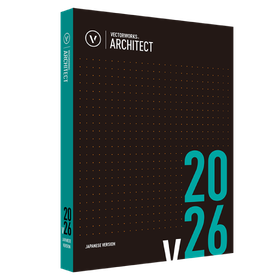
  2. Vectorworks Architect 2026 オフィスプラス
  3. 【DANDOQ】Establishing rebar volume estimates in the initial design phase. SiftDDD
  4. 3D EXPERIENCE for the Architecture and Construction Industry 兼松エレクトロニクス デジタル・サービス本部
  5. 4 "Ordinary Building" Optional Features [Explained in Video] アイサンテクノロジー

Architectural design support software Product List

1~7 item / All 7 items

Displayed results

Revit add-on tool 'J-FTP for Revit'

Centralized management of Revit files! It is possible to open specified files directly.

"J-FTP for Revit" is a Revit add-on tool that centrally manages Revit files such as projects and families on a server. By connecting to a shared server with J-FTP, a list of folders and files on the server is displayed in the provided window. You can directly store the file you are editing on the server. Additionally, you can open specified files directly from the server's file list. 【Features】 ■ Display and edit FTP server file list ■ Open and save Revit files ■ Upload and download files *For more details, please download the PDF or feel free to contact us.

  • Other Software
  • Architectural design support software

Added to bookmarks

Bookmarks list

Bookmark has been removed

Bookmarks list

You can't add any more bookmarks

By registering as a member, you can increase the number of bookmarks you can save and organize them with labels.

Free membership registration

Company Profile of STUDIO55 Co., Ltd.

Seize the future that is right in front of you! We will support you in bringing out your design.

STUDIO55 Co., Ltd. is a special team specializing in CG, VR, BIM, point cloud data, software, design support, and metaverse production. We provide valuable services that leverage the high technical skills of knowledge workers in Asia and the large scale of their production systems, all under the solid grip of Japanese design management. We realize our clients' visions of "visualizing design data," "visualizing construction and architectural data," and "visualizing virtual reality" = the metaverse. 【Business Contents】 ■ VR (Virtual Reality) ■ VR Office ■ CG Animation ■ BIM & Point Cloud ■ Perspective ■ Original Metaverse Construction ■ Various Software Sales *For more details, please refer to the PDF materials or feel free to contact us.

  • Other construction services
  • Architectural design support software

Added to bookmarks

Bookmarks list

Bookmark has been removed

Bookmarks list

You can't add any more bookmarks

By registering as a member, you can increase the number of bookmarks you can save and organize them with labels.

Free membership registration

【DANDOQ】Establishing rebar volume estimates in the initial design phase.

It is possible to verify the feasibility of rebar placement while temporarily placing the cross-section during the basic design and estimation phase!

Introducing the automatic reinforcement and arrangement examination system "DANDOQ." This is a cloud service that automatically arranges rebar simply by inputting design data from a browser, while automatically avoiding interference between the rebars. Reinforcement is done according to "reinforcement standards" and "construction settings," and any unresolved issues are displayed in a list with reasons. 【Main Features】 ■ Input and automatic reinforcement of columns, beams, walls, slabs, foundations, piles, and steel column bases ■ Automatic avoidance of interference and presentation of reasons for areas that cannot be avoided ■ Confirmation in plan/axial/3D views and calculation of quantities ■ Import of IFC and ST-Bridge, and export of DXF, IFC, and ST-Bridge ■ No installation required; during the contract period, you can examine it as many times as you like, whenever you think of it. *For more details, please download the PDF or feel free to contact us.

  • Architectural Design Software
  • Architectural design support software

Added to bookmarks

Bookmarks list

Bookmark has been removed

Bookmarks list

You can't add any more bookmarks

By registering as a member, you can increase the number of bookmarks you can save and organize them with labels.

Free membership registration

"Ordinary Building" Optional Features [Explained in Video]

A comprehensive explanation from basic data to the creation of shape, area, site, and building drawings!

"The creation of a product specification document" is an optional feature of Wingneo INFINITY Ver. 5. This video explains the entire process from the basic data of ordinary buildings (building registration) to the creation of shape, area, site, and building drawings. The main components include basic information about the building, shape input, area calculation, setting of atriums, use of raster for the site, drawing conditions for location maps, alignment of buildings and sites, and the creation of building drawings, among various other functions. [Video Introduction (Excerpt)] ■ Creating a new site and starting the building ■ New creation of an ordinary building ■ Input of building shape ■ Calculation of building area ■ Input of the second floor shape, creation of atriums, and creation of ancillary buildings *For more details, please refer to the PDF document or feel free to contact us.

  • Other measuring instruments
  • Other Software
  • Surveying
  • Architectural design support software

Added to bookmarks

Bookmarks list

Bookmark has been removed

Bookmarks list

You can't add any more bookmarks

By registering as a member, you can increase the number of bookmarks you can save and organize them with labels.

Free membership registration

Vectorworks Architect 2026

Standalone version lease monthly fee: 7,400 yen (excluding tax)

Basic package + Specialized features for architecture A product for the architecture, interior design, and interior industries equipped with design support functions for the architectural field. Introduction to Vectorworks 2026 Standalone Version Usage Type Can be differentiated by environment One license can be installed on two machines. Designers can differentiate usage based on the environment, such as using a desktop in the office and a portable machine for outings. *Only one machine can operate simultaneously. No license authentication or procedures required Startup uses internet authentication. After the initial authentication, it can be used for 90 days without being connected to the network. *After the initial authentication, if started in an environment connected to the network, authentication will be performed automatically.

  • Architectural CAD
  • Architectural design support software

Added to bookmarks

Bookmarks list

Bookmark has been removed

Bookmarks list

You can't add any more bookmarks

By registering as a member, you can increase the number of bookmarks you can save and organize them with labels.

Free membership registration

3D EXPERIENCE for the Architecture and Construction Industry

Covering the process of architectural design production with a single source! Solution map for the architecture and construction industry.

Dassault Systèmes' 3DExperience platform strongly integrates brand products across 12 industries, providing various industry solution experiences required in each sector. For the architecture and construction industry, cloud solutions can be selected based on business conditions, including public cloud, private cloud, and on-premises options. The platform offers construction simulation, process planning, and performance management using BIM data. 【Features】 ■ Liberates BIM processes from the constraints of the Windows file system ■ Stores project data in a relational database ■ Comprehensive production BIM model for manufacturing ■ High-speed display of large BIM models ■ Diverse operational forms *For more details, please refer to the PDF materials or feel free to contact us.

  • Process Control System
  • Other CAD
  • Site Search
  • Architectural design support software

Added to bookmarks

Bookmarks list

Bookmark has been removed

Bookmarks list

You can't add any more bookmarks

By registering as a member, you can increase the number of bookmarks you can save and organize them with labels.

Free membership registration

Estimation of rebar quantity and preparation of cost estimation documents.

You can check the breakdown by hierarchy, component, and code, and it can be exported as a CSV!

Introducing the automatic rebar placement and arrangement examination system "DANDOQ." This cloud service automatically places rebar and avoids interference between rebars simply by inputting design data from a browser. Rebar is arranged according to "rebar placement standards" and "construction settings," and any unresolved issues are displayed in a list with reasons. 【Main Features】 ■ Input and automatic rebar placement for columns, beams, walls, slabs, foundations, piles, and steel column bases ■ Automatic avoidance of interference and presentation of reasons for areas that cannot be avoided ■ Confirmation in plan/axial/3D views and calculation of quantities ■ Import of IFC and ST-Bridge, and output of DXF, IFC, and ST-Bridge ■ No installation required; during the contract period, you can examine it as many times as you like on any day you decide. *For more details, please download the PDF or feel free to contact us.

  • Architectural Design Software
  • Architectural design support software

Added to bookmarks

Bookmarks list

Bookmark has been removed

Bookmarks list

You can't add any more bookmarks

By registering as a member, you can increase the number of bookmarks you can save and organize them with labels.

Free membership registration